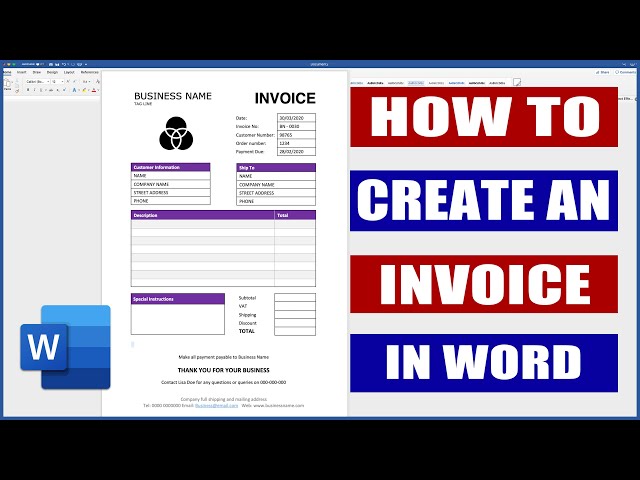
An invoice is a commercial document that itemizes and records a transaction between a buyer and seller. Creating an invoice in Microsoft Word is a common practice for businesses and individuals who need to bill clients for goods or services. It’s a convenient and efficient way to manage invoicing, as Word provides templates and tools that make it easy to create professional-looking invoices.
Invoices are essential for businesses as they provide a clear record of transactions, facilitate payment tracking, and ensure accurate accounting. They also serve as legal documents that can be used in case of disputes or audits. Historically, invoices have been handwritten or created using typewriters, but with the advent of computers and word processing software, creating invoices has become significantly easier and more efficient.
This article will provide a comprehensive guide on how to create an invoice in Microsoft Word, covering essential elements, formatting, and best practices. By following these steps, you can create professional and compliant invoices that effectively manage your billing process.
Create an Invoice in Word
Creating an invoice in Word involves several essential aspects that contribute to its effectiveness and compliance. These aspects encompass the structural elements, formatting, and content of the invoice, ensuring that it accurately reflects the transaction and meets the requirements of both the sender and recipient.
- Header: Company name, logo, contact information
- Invoice Number: Unique identifier for the invoice
- Invoice Date: Date the invoice was issued
- Customer Information: Name, address, contact details of the customer
- Itemized List: Description, quantity, price, and total for each item
- Subtotal: Total amount before taxes and discounts
- Taxes: Applicable taxes, such as sales tax or VAT
- Discounts: Any discounts applied to the invoice
- Total Amount: Final amount due, including taxes and discounts
These aspects are interconnected and essential for creating a clear, accurate, and legally compliant invoice. The header establishes the identity of the sender and provides contact information for inquiries. The invoice number and date serve as unique identifiers for tracking and referencing purposes. Customer information ensures the invoice is directed to the correct recipient and includes necessary details for communication. The itemized list captures the details of the goods or services provided, including their description, quantity, price, and total cost. The subtotal, taxes, discounts, and total amount provide a clear breakdown of the invoice’s financial components. Together, these aspects form a comprehensive invoice that effectively records and communicates the transaction details.
Header
In the context of creating an invoice in Word, the header plays a crucial role in establishing the identity of the sender and providing essential contact information. It typically includes the company name, logo, and contact details such as address, phone number, and email address. These elements work together to create a professional and recognizable invoice that instills trust and credibility in the recipient.
- Company Name: The company name prominently displayed in the header immediately identifies the sender of the invoice. It serves as a visual representation of the business and reinforces brand recognition.
- Logo: A company logo is a graphical representation that visually communicates the brand’s identity. Including a logo on the invoice enhances brand recall, reinforces professionalism, and adds a touch of visual appeal.
- Contact Information: Clearly displaying contact information in the header allows the customer to easily reach the sender for inquiries, clarifications, or follow-up communications. This information typically includes the business address, phone number, and email address.
Overall, the header section of an invoice in Word serves multiple purposes. It establishes the sender’s identity, builds brand recognition, provides essential contact information, and contributes to the overall professionalism of the invoice. By including these elements in the header, businesses can create invoices that are both informative and visually appealing, enhancing the customer experience and fostering trust.
Invoice Number
When creating an invoice in Word, assigning a unique invoice number is a crucial aspect that ensures efficient tracking, organization, and retrieval of invoices. It serves as a primary identifier for each transaction, enabling businesses to maintain a clear and systematic record of their billing activities.
- Sequential Numbering: Invoice numbers typically follow a sequential numbering system, ensuring that each invoice has a unique and consecutive identifier. This systematic approach simplifies invoice tracking and retrieval, especially when dealing with a large volume of invoices.
- Unique Identification: Each invoice number should be distinctive and non-repeating, allowing for easy identification and avoidance of confusion. Assigning unique invoice numbers helps prevent errors and ensures that each invoice is associated with a specific transaction.
- Historical Reference: Invoice numbers serve as a valuable historical reference for businesses. By maintaining a chronological sequence of invoice numbers, companies can easily trace and retrieve past invoices, facilitating audits, resolving disputes, and providing customer support.
- Legal Compliance: In some jurisdictions, businesses may be required to maintain a sequential and unique invoice numbering system for legal and tax compliance purposes. Assigning proper invoice numbers helps businesses meet these regulatory requirements.
In summary, the “Invoice Number: Unique identifier for the invoice” aspect of creating an invoice in Word is essential for maintaining organized and retrievable invoice records. Businesses can leverage sequential numbering, ensure uniqueness, utilize invoice numbers for historical reference, and comply with legal requirements by implementing a robust invoice numbering system.
Invoice Date
The “Invoice Date: Date the invoice was issued” aspect of creating an invoice in Word holds significant importance in the invoicing process. It serves as a crucial piece of information that establishes the timeline of the transaction and has several implications for businesses and their clients.
Firstly, the invoice date plays a vital role in determining the payment terms and due date. It sets the starting point for calculating the payment period, ensuring timely payments and preventing late payment penalties. Businesses often include clear payment terms on their invoices, specifying the number of days within which the invoice amount is expected to be settled. The invoice date serves as the reference point for this calculation, ensuring that both parties are aware of the payment timeline.
Furthermore, the invoice date is critical for maintaining accurate financial records. It helps businesses track their income and expenses effectively by providing a clear timestamp for each transaction. This information is essential for accounting purposes, tax calculations, and financial reporting. Accurate invoice dating ensures that businesses have a reliable record of their financial activities, allowing them to make informed decisions and maintain compliance with accounting standards.
In summary, the “Invoice Date: Date the invoice was issued” is a critical component of creating an invoice in Word, as it establishes the payment timeline, facilitates accurate financial record-keeping, and supports legal compliance. Understanding the importance of this aspect enables businesses to create invoices that are both informative and legally sound, fostering trust and maintaining smooth financial transactions.
Customer Information
In the context of creating an invoice in Word, the section dedicated to customer information is a vital component that establishes the recipient of the invoice and serves as a critical touchpoint for communication. It typically encompasses the customer’s name, address, and various contact details, including phone number, email address, and website. This information plays a crucial role in the invoicing process and has several important implications.
Firstly, accurate and complete customer information ensures that the invoice reaches the intended recipient without any delays or errors. A clear and well-defined customer name and address facilitate efficient delivery, whether physical or electronic. Additionally, providing multiple contact details offers the customer various channels for communication, allowing them to promptly clarify any queries or provide additional information as needed.
Furthermore, customer information serves as a reference point for future interactions. By maintaining a database of customer information, businesses can easily retrieve invoices, track payment history, and manage customer relationships more effectively. This information is particularly valuable for businesses that engage in repeat transactions with their customers, as it enables them to quickly access relevant details and tailor their communication accordingly.
In summary, the “Customer Information: Name, address, contact details of the customer” aspect of creating an invoice in Word is essential for accurate delivery, clear communication, and effective customer relationship management. Understanding the significance of this information allows businesses to create invoices that are both professional and efficient, fostering trust and maintaining smooth business transactions.
Itemized List
Within the context of creating an invoice in Word, the itemized list stands as a crucial aspect that captures the details of goods or services provided, forming the core of the invoice’s content. This list comprises four key components: description, quantity, price, and total, each playing a distinct role in conveying the specifics of the transaction.
- Description: This field provides a clear and concise description of the item or service being invoiced, ensuring a precise understanding of what is being charged.
- Quantity: The quantity column specifies the number of units, hours, or any other relevant measure associated with the item or service, indicating the extent of the transaction.
- Price: The price column reflects the agreed-upon unit price or rate for the item or service, excluding any applicable taxes or discounts.
- Total: The total column calculates the line total for each item or service by multiplying the quantity by the price, providing a clear breakdown of the charges.
Collectively, these components form the foundation of the itemized list, offering a comprehensive view of the goods or services provided and their respective costs. Accurate and detailed itemized lists are essential for ensuring transparency, preventing disputes, and maintaining a clear record of the transaction for both the sender and recipient of the invoice.
Subtotal
In the realm of “create an invoice in word”, understanding the “Subtotal: Total amount before taxes and discounts” holds immense importance. The subtotal serves as a stepping stone in calculating the final amount due, providing a snapshot of the total charges prior to the application of taxes and discounts.
- Pre-tax and Pre-discount Amount: The subtotal represents the sum of all line item charges before any taxes or discounts are applied. It reflects the base value of the goods or services provided.
- Cumulative Line Item Totals: The subtotal is calculated by summing up the total values of each line item, providing a consolidated view of the charges before any adjustments.
- Basis for Tax Calculations: For invoices subject to taxes, the subtotal forms the base amount upon which tax calculations are performed, ensuring accurate tax computations.
- Discount Eligibility Assessment: The subtotal helps determine the eligibility of discounts based on pre-defined thresholds or customer-specific agreements, influencing the final amount due.
Comprehensively understanding these facets of “Subtotal: Total amount before taxes and discounts” empowers businesses to create invoices that are precise, transparent, and compliant with established tax and accounting regulations.
Taxes
In the context of “create an invoice in word”, understanding the significance of “Taxes: Applicable taxes, such as sales tax or VAT” is paramount. Taxes represent a crucial aspect of invoicing, with their inclusion directly impacting the final amount due and overall accuracy of the invoice. The legal obligation to collect and remit taxes varies across jurisdictions, making it essential for businesses to stay informed about the applicable tax laws and regulations.
When creating an invoice in word, the inclusion of taxes involves calculating the appropriate tax amount based on the subtotal and applying it accordingly. This process ensures compliance with tax regulations and avoids potential legal consequences. Moreover, clearly outlining the tax details on the invoice enhances transparency and instills trust in the customer, as it provides a clear breakdown of the charges.
Real-life examples of “Taxes: Applicable taxes, such as sales tax or VAT” within “create an invoice in word” abound. Consider a business operating in a region where sales tax is applicable. When creating an invoice, the business must calculate the sales tax based on the subtotal of the goods or services sold and include it as a separate line item. This ensures that the customer is aware of the tax amount and that the business complies with the local tax laws.
The practical significance of understanding the connection between “Taxes: Applicable taxes, such as sales tax or VAT” and “create an invoice in word” lies in its impact on business operations and financial reporting. Accurate tax calculations prevent legal complications, maintain financial integrity, and foster trust with customers. Moreover, having a clear understanding of tax implications empowers businesses to make informed decisions regarding pricing, budgeting, and financial planning.
Discounts
In the realm of “create an invoice in word”, comprehending the significance of “Discounts: Any discounts applied to the invoice” holds immense practical value. Discounts, when offered, directly impact the final amount due, influence customer satisfaction, and contribute to the overall accuracy and transparency of the invoice. Understanding the various facets of discounts empowers businesses to harness their potential effectively.
- Types of Discounts: Discounts can take diverse forms, such as bulk discounts for high-volume purchases, loyalty discounts for repeat customers, or seasonal discounts to promote time-sensitive sales.
- Discount Calculation: Discounts are typically calculated as a percentage or fixed amount deducted from the subtotal, resulting in a reduced total amount due.
- Real-Life Examples: E-commerce platforms frequently offer promotional discounts during holiday seasons or to first-time customers, while retail stores may provide loyalty discounts to members.
- Implications for Businesses: Offering discounts can enhance customer loyalty, attract new clients, and boost sales. However, businesses must carefully consider profit margins and overall financial implications before implementing discount strategies.
Understanding the nuances of “Discounts: Any discounts applied to the invoice” within the context of “create an invoice in word” allows businesses to leverage discounts strategically. Discounts can serve as powerful tools for driving sales, building customer relationships, and optimizing revenue. By incorporating discounts into their invoicing process, businesses can create invoices that are not only accurate but also tailored to specific customer needs and market dynamics.
Total Amount
In the context of “create an invoice in word”, the “Total Amount: Final amount due, including taxes and discounts” aspect holds immense significance, serving as the culmination of the invoice’s calculations and providing the final sum that the customer owes. Understanding its various facets is crucial for creating accurate and legally compliant invoices.
- Components: The total amount encompasses the subtotal, taxes, and discounts applied to the invoice. It represents the final sum due from the customer.
- Real-Life Examples: In an invoice for goods purchased, the total amount would include the cost of the items, applicable sales tax, and any discounts offered.
- Implications for Businesses: Ensuring accuracy in calculating the total amount is essential for maintaining financial integrity and avoiding disputes with customers.
- Legal Compliance: In some jurisdictions, businesses may be legally required to display the total amount prominently on the invoice.
In conclusion, the “Total Amount: Final amount due, including taxes and discounts” aspect of “create an invoice in word” plays a vital role in providing a clear and accurate summary of the invoice’s charges. Businesses must pay close attention to each component of the total amount to ensure compliance, maintain financial integrity, and foster trust with their customers.
Frequently Asked Questions
This section aims to address common queries and clarify aspects related to creating invoices in Microsoft Word.
Question 1: Can I create an invoice in Word without a template?
Answer: Yes, you can create an invoice in Word from scratch using its built-in tools and features. However, using a template can save time and ensure a professional appearance.
Question 2: What are the essential elements of an invoice?
Answer: An invoice typically includes a header with your company information, an invoice number, invoice date, customer information, itemized list of goods or services, subtotal, taxes, discounts, and total amount due.
Question 3: How do I calculate the total amount due?
Answer: The total amount due is calculated by adding the subtotal, taxes, and any applicable discounts.
Question 4: Can I customize the invoice template?
Answer: Yes, Word templates are highly customizable. You can modify the design, add your branding, and include additional fields as needed.
Question 5: How do I save an invoice as a PDF?
Answer: In Word, go to “File” > “Save As” and select “PDF” from the “Save as type” drop-down menu.
Question 6: What are some best practices for creating invoices in Word?
Answer: Use clear and concise language, ensure accuracy in calculations, keep a consistent format, and send invoices promptly.
These FAQs provide a foundation for understanding the key aspects of creating invoices in Microsoft Word. In the following sections, we will delve deeper into specific features and techniques to help you create professional and effective invoices.
Tips for Creating Professional Invoices in Word
This section provides practical tips to enhance the quality and effectiveness of your invoices. Implementing these tips will help you create professional, clear, and legally compliant invoices that foster trust and streamline your billing processes.
Tip 1: Use a Clear and Consistent Format: Maintain a consistent layout and typography throughout your invoices to enhance readability and professionalism. Consider using a template to ensure uniformity.
Tip 2: Include All Essential Elements: Ensure your invoices include all necessary information, such as company details, invoice number, invoice date, customer information, itemized list, subtotal, taxes, discounts, and total amount due.
Tip 3: Be Accurate and Detailed: Provide accurate and detailed descriptions of goods or services, including quantities, prices, and any applicable taxes. This helps avoid confusion and disputes.
Tip 4: Use Clear Language: Use simple and concise language that is easy for customers to understand. Avoid technical jargon or ambiguous terms.
Tip 5: Proofread Carefully: Before sending invoices, proofread them thoroughly to eliminate any errors in calculations, spelling, or grammar. Accurate invoices instill trust and reflect positively on your business.
Tip 6: Send Invoices Promptly: Issue invoices promptly after completing the transaction. Timely invoicing ensures faster payments and reduces the risk of late payments.
Tip 7: Offer Multiple Payment Options: Provide customers with multiple payment options, such as online payments, bank transfers, or credit card payments, to enhance convenience and streamline the payment process.
Tip 8: Store Invoices Securely: Keep a secure and organized record of all invoices for future reference, tax purposes, and dispute resolution.
By following these tips, you can create professional and legally compliant invoices that facilitate efficient billing, foster customer satisfaction, and contribute to the overall success of your business. These practices lay the foundation for effective invoice management and lay the groundwork for the concluding section, which will delve into advanced techniques for optimizing your invoicing workflow.
Conclusion
This comprehensive guide has explored the intricacies of “create an invoice in word”, shedding light on its significance, essential elements, best practices, and advanced techniques. Understanding the nuances of invoice creation in Microsoft Word empowers businesses to create professional, accurate, and legally compliant invoices that facilitate efficient billing, foster customer satisfaction, and contribute to overall business success.
Key insights from this exploration include the importance of using clear and consistent formats, including all essential elements, and proofreading carefully to ensure accuracy. Additionally, businesses should leverage technology to streamline their invoicing processes, explore integration with accounting software, and consider adopting e-invoicing for enhanced efficiency and cost-effectiveness.